ReShot 0.5 by Maosika — turn any reference clip into a skeleton video and recast the dance or the fight with your own characters; 90 seconds on a Mac
Skeleton and line outputs join the depth map; why a skeleton that does not flicker is the hard part and how we did it; the three demo takes re-made on MiniMax H3 with the same prompts, results shown as they are
Maosika (www.maosika.com) open-sourced ReShot last month. Today it ships 0.5.0: a reference clip can now come out not only as a depth map but as a skeleton video and a line video. One clip in, coloured stick figures on black out; hand it to Seedance or MiniMax H3 as the reference and the moves are copied limb by limb — with your own characters in them.
First, the goods.
The reference is the same corridor fight as last time. Top right is the skeleton ReShot extracted: one stick figure per person, fingers included, no face.
The three takes below — armoured warrior, woman in a qipao, cartoon rabbit boxer — use exactly the prompts and character sheets of the depth-map article, only the reference video was swapped from the grey clip to this skeleton.
Kicking off the wall, being lifted and thrown, slamming into the panel, walking out: all six beats, all three takes. The throw reads more clearly from the skeleton than it did from the depth map — the guard really is in the air.
What the skeleton keeps, what the depth map keeps, which to pick
The previous article covered depth: the picture is flattened to grey blobs, near = white, far = black, and all that survives is who stands where, who is bigger, how they move and how the camera moves. Faces and clothes cannot be copied because they are not there.
A skeleton goes further. It drops the blobs too and keeps only joints and the lines between them.
| depth map | skeleton | |
|---|---|---|
| keeps | blocking, scale, moves, camera, the shape of the set | every limb and every hand, exactly |
| drops | faces, clothes, lighting, style | everything else, body shape and set included |
| pick it for | anything, people or not | dance, martial arts, anything where the limbs are the point |
In one line: skeleton for dance and fights, depth for everything else, both when unsure — --control depth,pose writes both, and you see which one the model follows better.
Lines are the third kind: white edges on black, no model, instant. They carry the outline of clothes and faces too, so "copy the shot, not the actors" is only half true for them; use them when you want the whole layout of the frame.
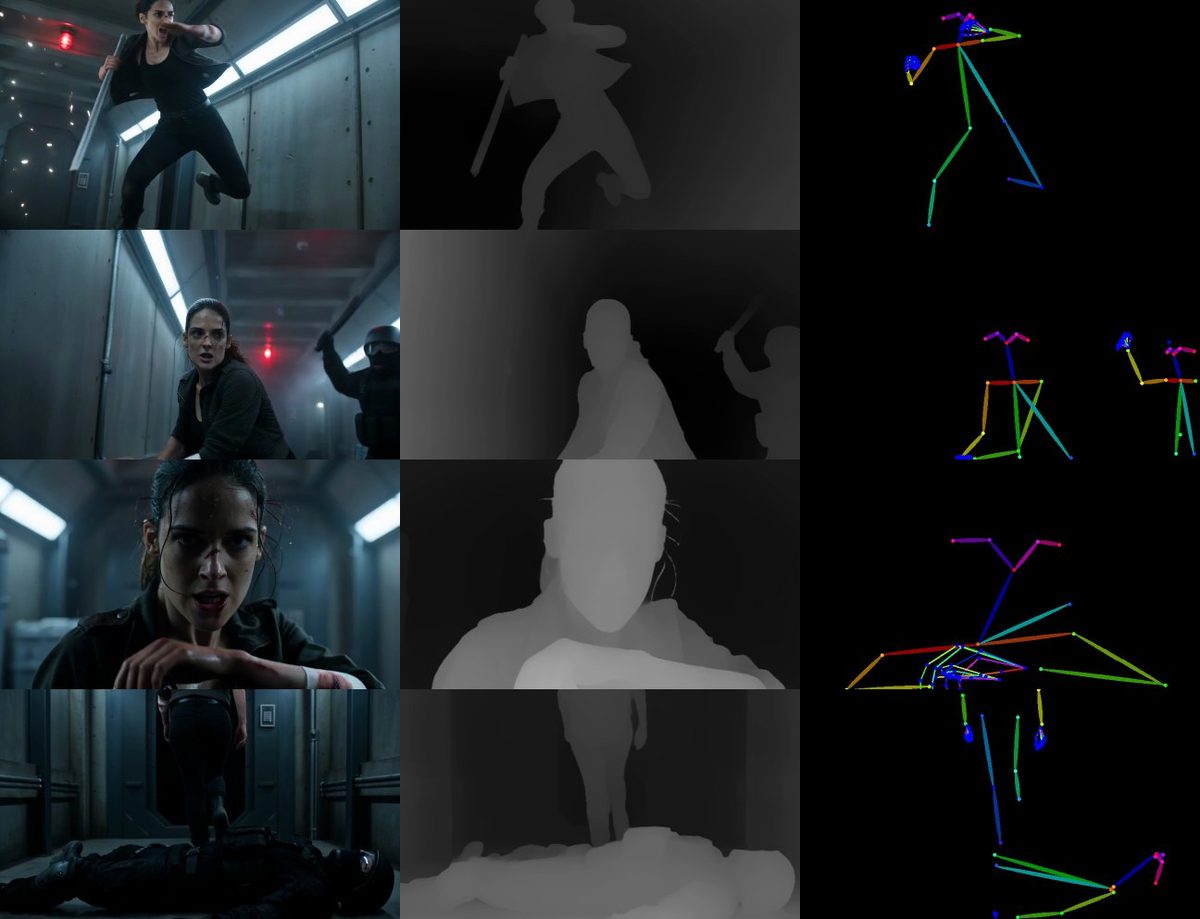
One case where the skeleton is the wrong tool: a tight close-up. Only a face in frame, shoulders and hips off screen — the estimator still guesses them and draws them along the frame edge. Use depth for close-ups.
A skeleton that does not flicker is the hard part
Plenty of models extract skeletons; running one frame by frame is easy. Whether the result is usable is another matter.
Per-frame output flickers in three ways: two people swap places between frames; joints jitter by a pixel or two; a limb near the confidence threshold blinks in and out. A video model reads all three as motion, and the generated character twitches with it.
ReShot does three things. Each person gets a stable identity across frames, matched by the overlap of their body boxes. Once a joint is drawn it stays until its score drops well below the threshold, instead of toggling at the edge. Every joint runs through a One-Euro filter — still at rest, quick to follow a punch.
It is the same idea as the depth map's "one scale for the whole clip": decide once along the time axis, not per frame.
The model is DWPose — a person detector plus a 133-point whole-body estimator, code and weights both Apache-2.0. There is a more important reason to pick it: it is the estimator ComfyUI uses to make pose images for ControlNets, drawn in the OpenPose layout, so our skeletons look like what the video models were trained on.
Hands on, face off by default. Hands are grips and gestures and have to stay; the face shape is exactly what we want gone.
Speed
Detection is the cost. On a Mac's CPU the detector takes 368 ms per frame, the pose estimator 75.
So the detector runs every third frame, and the previous frame's skeletons supply the boxes in between; a cut in the clip, or a skeleton whose score has become unreliable, brings the detector back at once.
On the 289-frame corridor clip, against detecting every frame: 280 frames with the same people, 80 % of joints within 2 px, 35 % faster. The 9 differing frames are someone entering the shot and getting their skeleton one or two frames late. --pose-detect-every 1 turns it off.
On an M2 Max the 12-second clip takes 90 seconds. onnxruntime-gpu makes it faster on an NVIDIA card.
How to use it
Install:
pip install "reshot[pose]"
reshot
A page opens in the browser. There is a new choice at the top right — *What to make*: depth map, skeleton, lines. Pick skeleton, drop the clip in, click. Reference and skeleton side by side, a download button, and next to it *Download keypoints JSON* — every person in every frame, 134 points with scores and a stable id, for editing, retargeting or analysis.
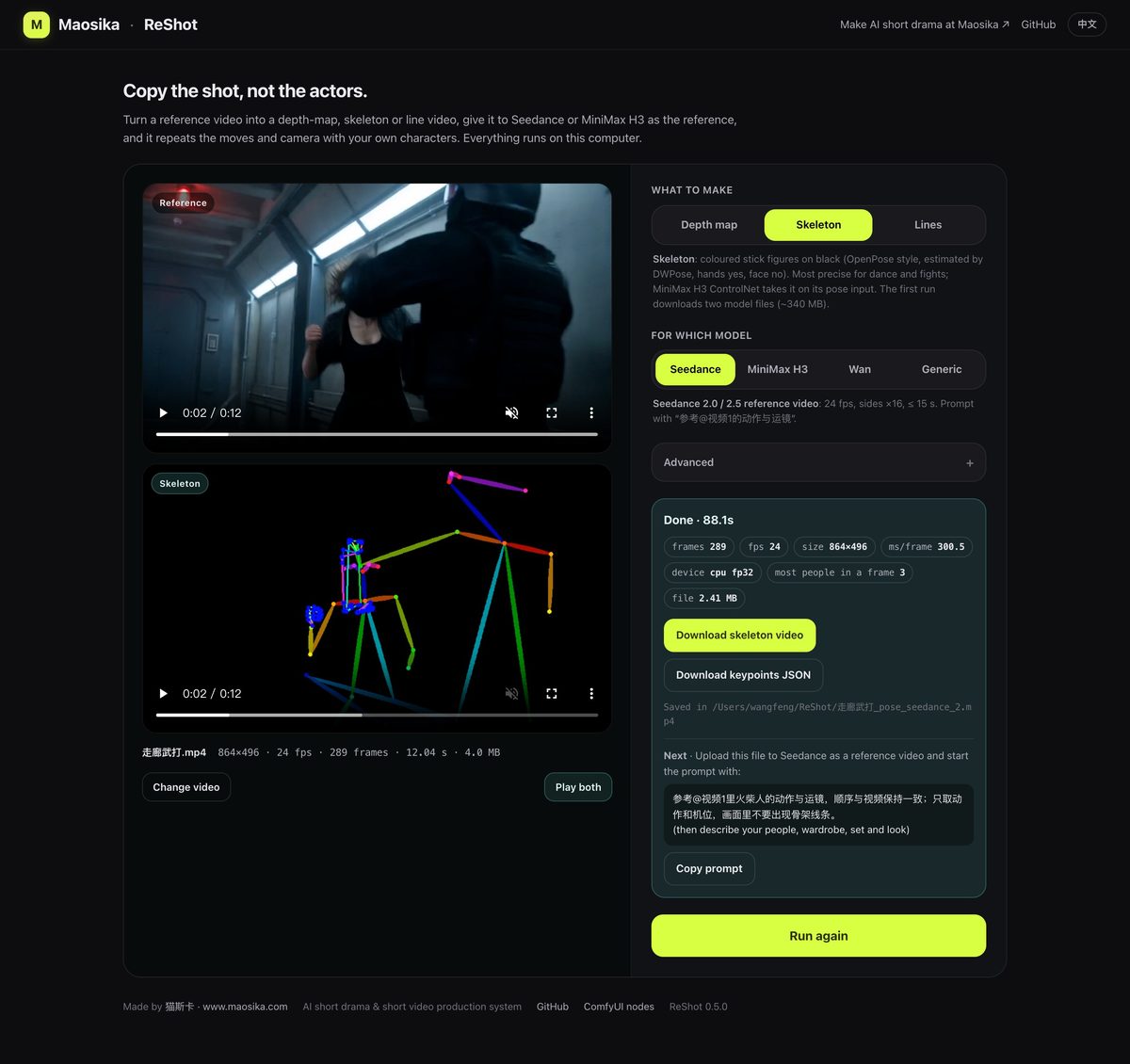
Command line: reshot reference.mp4 -o pose.mp4 --control pose --target h3.
ComfyUI: the ComfyUI-ReShot node pack is at 0.2.0 with two Pose and two Canny nodes next to the Depth ones — one takes VIDEO and returns VIDEO, one takes frames and returns frames — and plugs straight into the pose input of the MiniMax H3 Fun ControlNet.
The first run downloads two model files, about 340 MB.
Verified on the real model, stated as it is
The three takes above were made on MiniMax H3 with the same prompts, sheets and reference size as the depth-map takes; only the two sentences describing the reference changed — "a grey depth map" became "an OpenPose skeleton video", and "the grey look is not to be copied" became "the stick-figure look is not transferred". The full prompts with seeds are in docs/prompts/ in the repository.
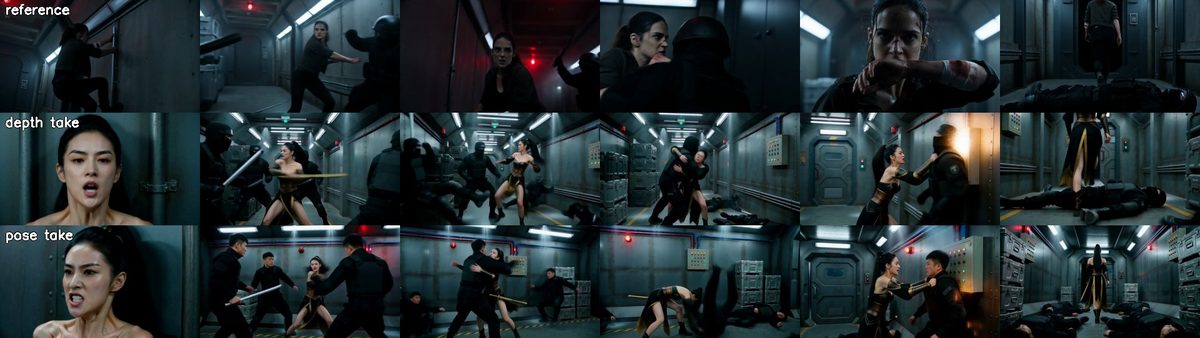
All six beats are there, at the same level as the depth-map takes. One take per condition with different seeds, so the honest reading is "a skeleton works as a reference video too", not "a skeleton is better".
One thing neither version got: the second shot of the reference is the kick off the wall to tear down a pipe, and both references went straight into the brawl. That is the model's reading of that shot, not the reference's fault.
GitHub: maosika-ai/reshot, or pip install "reshot[pose]".
Made a dance take from a skeleton? Post it in the repository's Discussions — we have tested fights enough and would like to see dance.
Links
- Repository: github.com/maosika-ai/reshot (Apache-2.0, English and Chinese README)
- Release notes: releases/tag/v0.5.0
- ComfyUI nodes: github.com/maosika-ai/ComfyUI-ReShot
- PyPI: pypi.org/project/reshot
- Previous article (depth map): www.maosika.com/p/1026
- Maosika: www.maosika.com
About Maosika — Maosika · Professional AI Video Production System. It connects briefing, scripting, look development, shot prompts and delivery into one reviewable pipeline. www.maosika.com